
Whether you're running an indoor golf venue, a batting cage, or a coworking space, growth usually comes down to the same things: getting more people through the door, turning first-time visitors into regulars, and not losing hours of your week to admin work along the way.
This month's update gives you four new tools for exactly that. You can now run your own promotions with Discount Codes, set up a membership without ever opening Stripe, offer a more flexible way to handle cancellations when a member's plans change, and set your own invoice due dates instead of a fixed default. Here's what's new and how to put it to work.
Here’s what we’ve built this month:
Run your own promotions with Discount Codes
From Settings → Discount Codes, you can create a code with a percentage or fixed-amount discount, set how long it's valid, and control how many times each customer can redeem it. Customers enter the code at checkout and see their new total instantly — no extra steps for you.
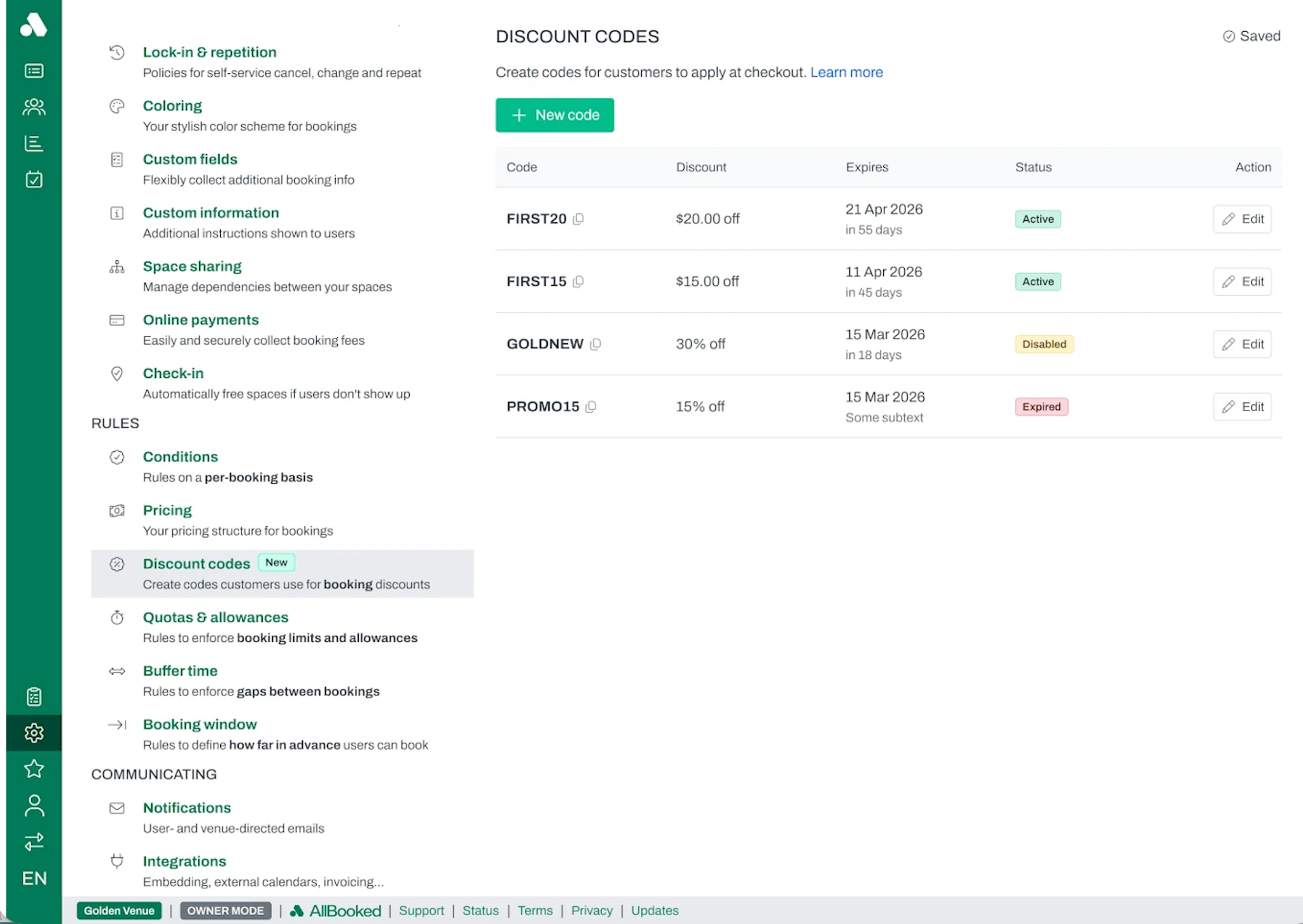
Example: An indoor golf venue creates a code for 15% off bookings in the summer months.
Note: Discount Codes apply to single bookings (not recurring bookings or memberships), and only one code can be used per booking. Core plans can run one active code at a time; Business and Advanced plans can run up to 100.
(Discount Codes are available on all AllBooked plans)
Create a membership without leaving AllBooked
Memberships turn repeat visitors into predictable, recurring revenue.
Now you can create a membership directly from your Memberships settings. Enter a name, set the price, choose a billing interval (daily, weekly, monthly, or yearly), and AllBooked handles the rest, creating the underlying Stripe billing setup automatically and keeping it in sync.
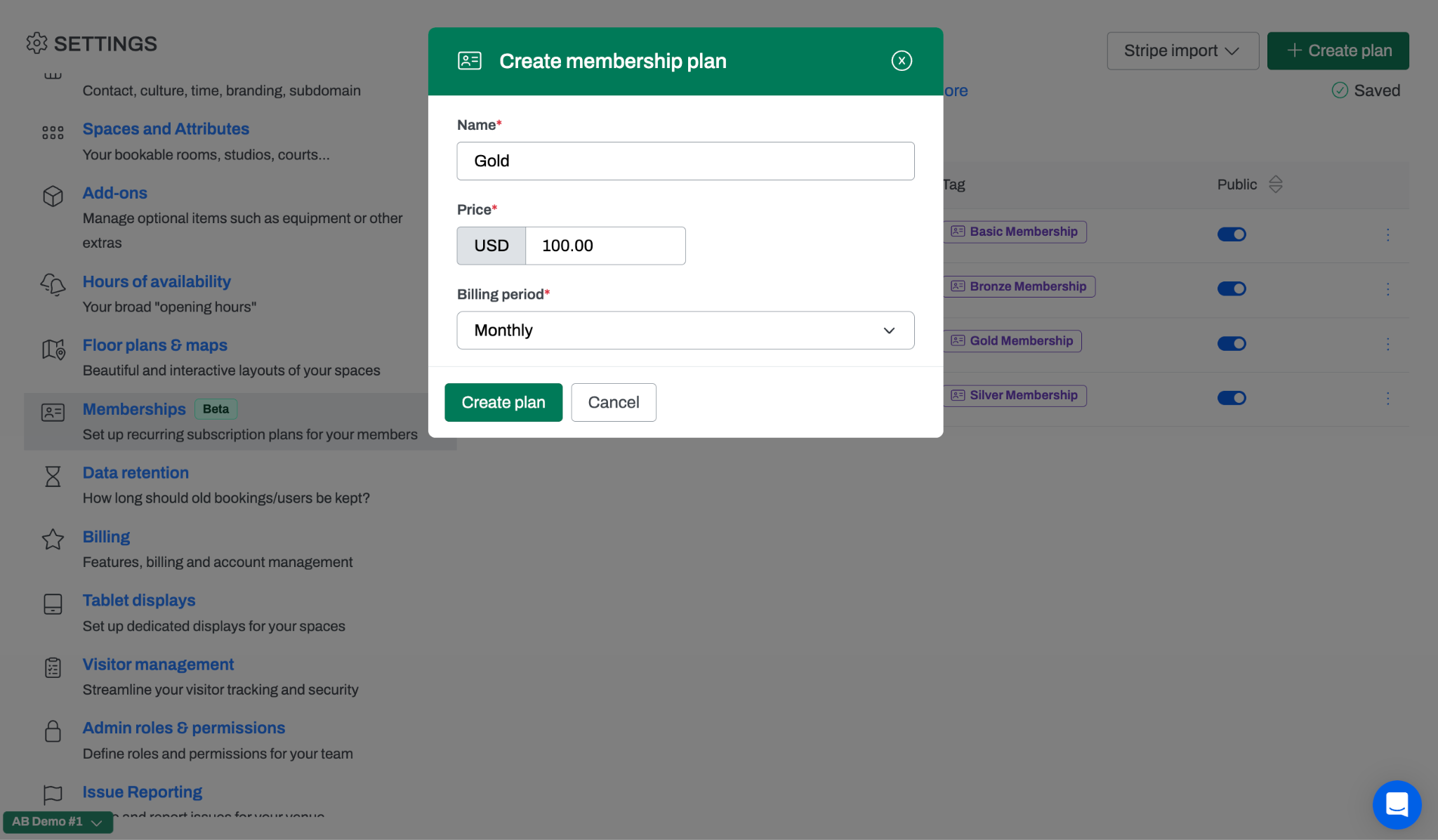
Example: A batting cage sets up a "Cage Pass" monthly membership in a couple of seconds, without ever touching a Stripe dashboard.
Note: Once a membership is created, you can rename it right in AllBooked, but the price, currency, and billing interval stay fixed. If you need to change those later, you'll do it in Stripe. This is intentional: it keeps existing subscribers protected from unexpected billing changes.
(Memberships is available on the AllBooked Advanced plan)
Cancel memberships without cutting off access early
Cancellations happen – but ending a membership immediately, even when a member has already paid for the current period, can feel abrupt and often leads to refund requests.
Now, when a membership is canceled (whether you do it as the admin or the member cancels themselves from their profile), you can choose to end it immediately or at the end of the current billing period. End-of-period is the default. The member keeps their access through the time they've already paid for, and the membership simply doesn't renew after that.
Example: A sports facility member heading out of town for the season cancels their membership but keeps full access through the days they've already paid for.
Note: If someone changes their mind, either the member or the admin can reverse a scheduled cancellation with one click before it takes effect. The membership will pick back up right where it left off, with no re-signup needed.
(Memberships is available on the AllBooked Advanced plan)
Set your own invoice due dates
Now you can set your own default. From Settings → Online Payments, under Invoice Payment Terms, enter how many days from receipt an invoice should be due. Leave it blank and it stays at the standard 30 days. Once set, every invoice you send (single or batch) reflects your custom terms automatically, both in AllBooked and on the invoice itself.
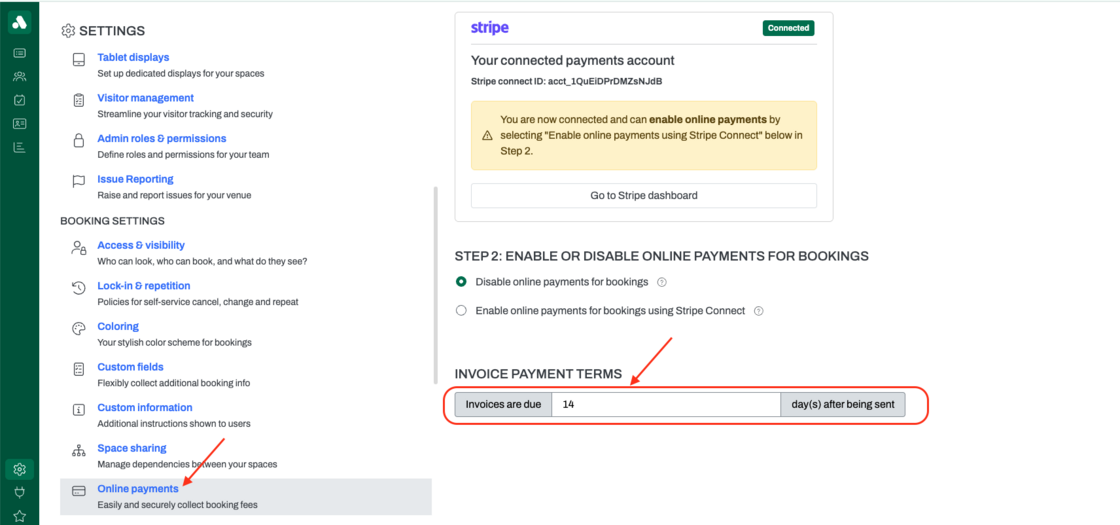
Example: A coworking space that expects payment within two weeks sets its terms to 14 days. From then on, every invoice sent (whether for one booking or a batch of them) is due in 14 days instead of 30, with no need to edit each one by hand.
(This is available on all AllBooked plans)
More ways to grow, without more manual work
Individually, each of these updates solves a specific problem. Together, they add up to something bigger: more ways to attract new customers, more ways to build lasting member relationships, and less time spent on the manual work (pricing, billing, and cancellations included) that used to get in the way of both.
Sign in to your AllBooked account to try Discount Codes, Memberships, and custom invoice terms today. If you have any questions, feel free to reach out to our team at info@allbooked.com.